SAS Tokens in Storage Account
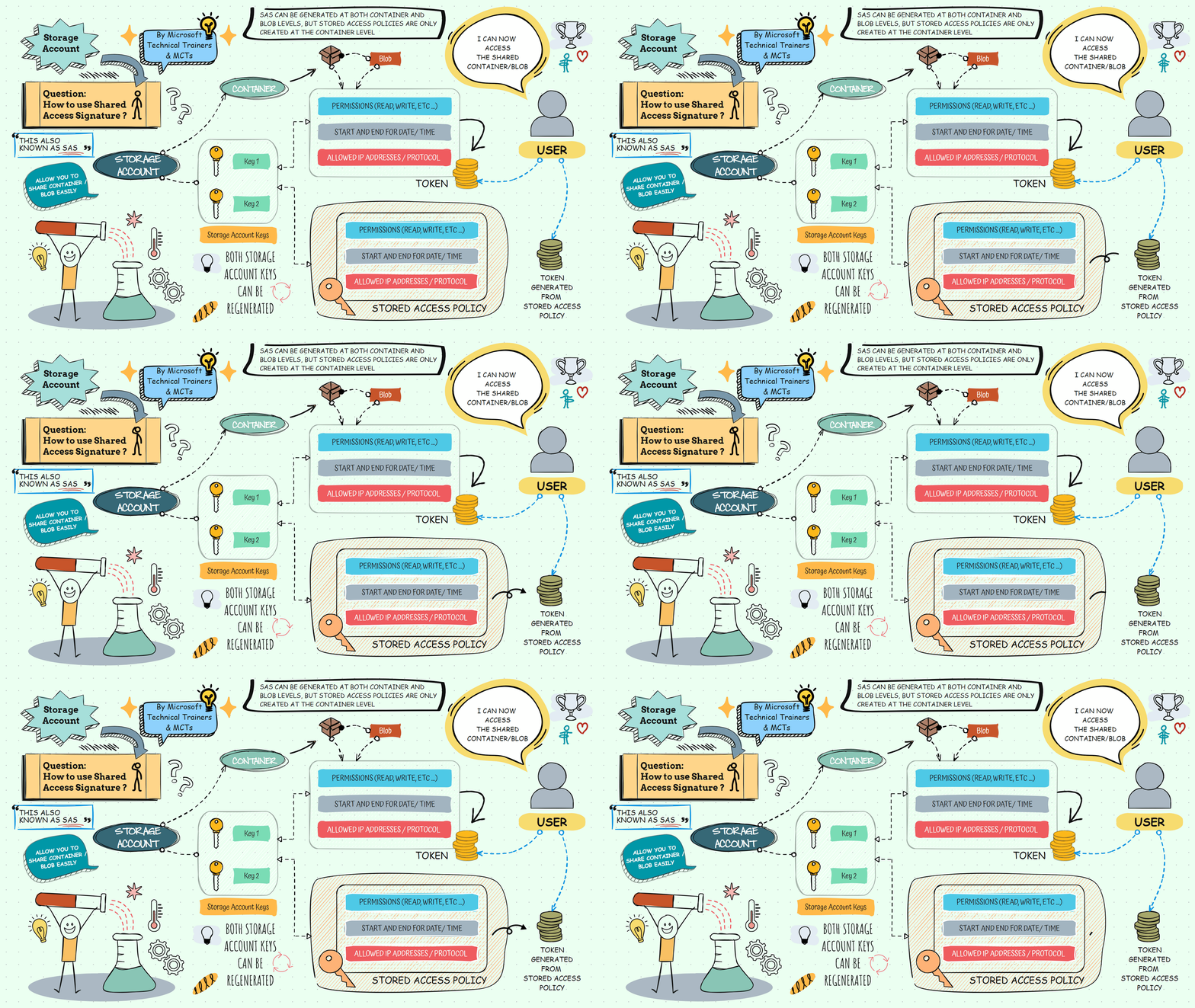
Shared Access Signature (SAS) allows users to share access to Azure Storage resources, such as blobs or containers, securely using a token. There are two methods to create a SAS token:
-
Directly from Blob or Container 📦
- Generate a SAS token directly from the specific blob or container you want to share.
- This method provides granular control over the permissions and duration of access.
- Note: If the token needs to be deleted, it can be voided by regenerating the storage account keys (either key 1 or key 2, which you used to derive the SAS token from).
-
Using Stored Access Policy 🗂️
- Create a stored access policy on the container level.
- Associate the SAS token with this policy to manage permissions and access duration centrally.
- This method is useful for managing multiple SAS tokens with the same settings.
- Highlight: Using stored access policy allows you to void the tokens without regenerating the storage account keys. Simply delete the stored access policy, and the token derived from the deleted stored access policy will also be voided.
Benefits of Using SAS Tokens 🌟
- Security: Share access without exposing your account keys.
- Granular Control: Specify permissions, start and expiry times, and IP address ranges.
- Flexibility: Use SAS tokens for various storage services like Blob, File, Queue, and Table.