🌳 Git Version Control & GitHub Flow
Git is the foundation of modern software development. Understanding version control and establishing an effective GitHub Flow is essential for individual developers and teams alike. Master Git to collaborate seamlessly, maintain code history, and ship with confidence!
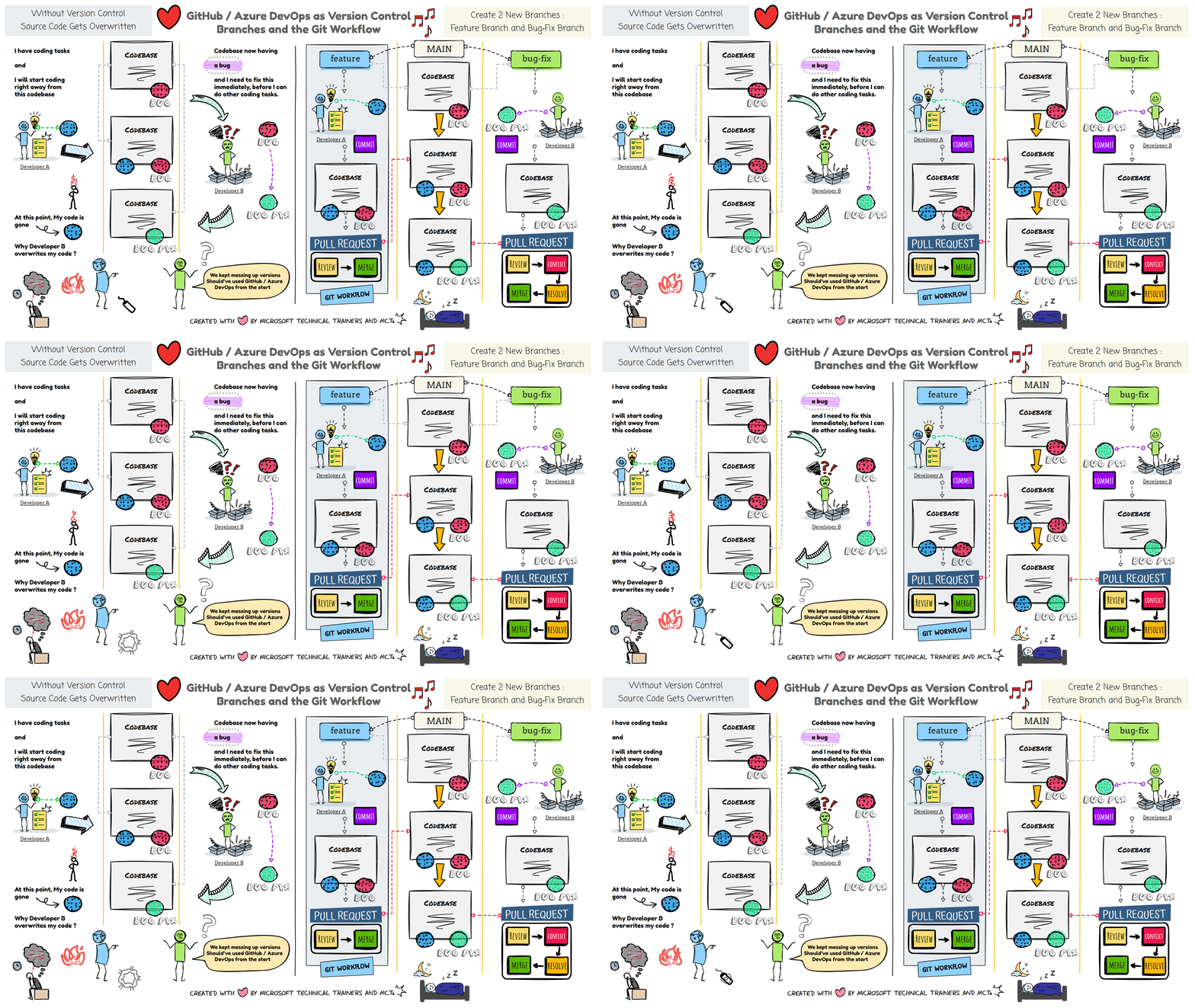
🎬 (Left Handside) Two Developers, One Codebase — No Version Control
👥 Same Codebase, Different Tasks
- Developer A is working on a new feature
- Developer B is fixing a bug
- Both are editing the same codebase at the same time
⚠️ No Version Control = Collision
Without any version control system, their changes start to conflict.
🏁 Race Condition Happens
- Developer A finishes first and checks in the feature
- Later, Developer B checks in the bug fix
- B’s update overwrites A’s work because nothing tracks or merges changes
💥 The Result
Work is lost. Code gets overwritten.
All because version control wasn’t used from the start.
🎬 (Right Handside) Branches + GitHub Flow — No More Overwritten Code
🌿 Two New Branches from Main
- We create two branches from the main branch
featurebranch for Developer Abug-fixbranch for Developer B
- Both developers can start working immediately without touching the main branch
🧑💻 Independent Workflows
- Developer A works safely on the feature branch
- Developer B works safely on the bug-fix branch
- The main branch stays clean and unchanged during development
🔄 GitHub Flow in Action
Developer A
- Commit changes
- Open a pull request
- Review → Approve → Merge into main
- Feature is now safely added
Developer B
- Commit changes
- Open a pull request
- Review → Conflict detected → Resolve → Merge into main
- Bug fix is added without overwriting anything
🎉 Final Result
Both developers’ changes end up in the main branch —
no code is lost, nothing gets overwritten, and everyone stays in sync.
All thanks to version control and GitHub Flow.